
Imagine a small business whose website has a broken contact button. An AI coding assistant may be able to repair the code. Getting that repair finished still involves someone describing the problem, passing along failed test results, relaying a colleague’s feedback and checking whether the change is ready to use. The person managing the work can remain busy even when the AI writes every line.
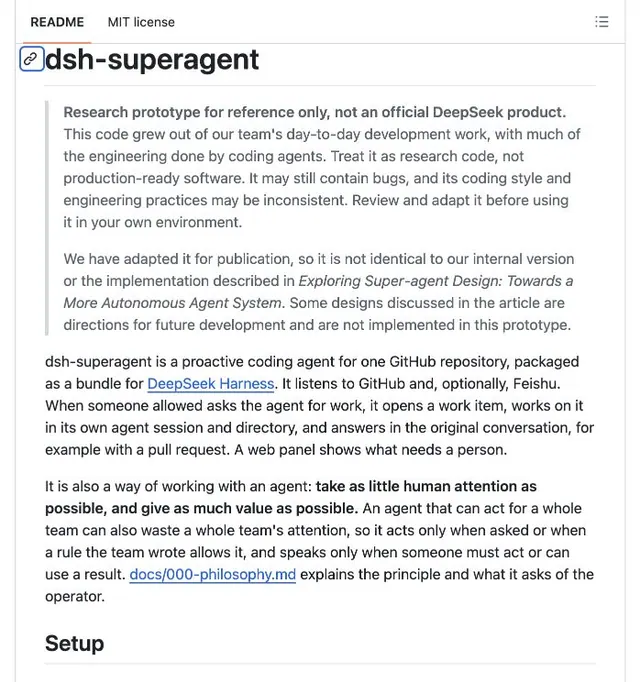
DeepSeek’s newly published dsh-superagent prototype tackles that surrounding work. It receives requests through GitHub, the service many teams use to store and review code, and optionally through Feishu chat. It keeps a record of a task, works on it and responds in the conversation where it was asked. The ambition is to reduce the attention needed to keep a job moving.
This is a research release for developers and software teams. The repository explicitly says it is not an official DeepSeek product or production-ready software. It is also something users deploy themselves, rather than a personal assistant supplied with a ready-made cloud computer. For a technically capable individual or small team, it offers a way to experiment with handing over more of a job. For someone seeking an assistant they can simply subscribe to, it is a different proposition.
What Changes After You Ask for a Fix
The public repository’s initial revision appeared on October 31. Super-agent is an add-on for DeepSeek Harness, the environment that runs its agents. It organizes work around one GitHub repository: a project’s collection of code and related files. It does not introduce a new language model, and installing it does not add these features to the ordinary DeepSeek chat application. The published code also differs from the team’s internal version; some ideas in the accompanying design article are still future directions.
Return to the broken button. In a deployment configured for that website’s repository, an authorized person could ask the agent to investigate through a GitHub issue or a configured Feishu conversation. The agent would create a persistent task, work in its own session and directory, and bring back a result such as a pull request: proposed code changes that someone can review before accepting them.
A later comment can then reach the existing task. A retry can retain the working files and proposed changes instead of beginning an unrelated conversation. If the service restarts, the recovery instructions tell the worker to inspect what already exists before repeating an outside action. This is the intended workflow, not a claim that TechReadly has tested a website repair with the prototype.
That continuity matters because “the AI has answered” and “the job is finished” are different events. A proposed change might still need a decision or review. Super-agent’s panel distinguishes work waiting for a person from work being processed, queued or blocked. A team can see where it needs to intervene rather than infer success from a quiet chat window.
Guangba Yu’s November 1 analysis of the prototype highlights this gap between model responses: late messages and interrupted processes can break a task even when individual answers are good. That is a useful way to judge the release. Its potential value lies in fewer lost handoffs and repeated explanations; the public material does not establish how much time a real team will save.
Where It Runs, and Why That Matters
The agent’s working environment belongs to the person deploying it. Its processes run on that machine, its working directories live there, and its management panel is served locally. If it runs on your laptop, shutting down that laptop stops that runtime. Running it on a suitable server you maintain could keep it independent of your laptop, but maintaining that server would still be your responsibility.
This is the important distinction from the hosted cloud-assistant model. An assistant that comes with a provider-managed computer removes much of the initial hosting work. Super-agent exposes a system that developers install and operate themselves. Its ability to keep a task across conversations should not be mistaken for DeepSeek providing an always-available hosted service.
Nor does local execution mean the language model runs locally. DeepSeek Harness needs a configured model provider; where requests are processed depends on that configuration. The agent’s files and processes, its model connection, and GitHub or Feishu are separate parts of the arrangement. Self-hosting this bundle alone does not make all of its work offline or keep every piece of data on one computer.
Can an Individual Use It? Does a Team Have to Apply?
An individual developer can try the public code against a repository they control. The documented setup can begin with GitHub alone and a permitted-user list containing just the operator. A company or a Feishu organization is not required for that route. However, the operator needs to be comfortable configuring development tools, accounts and a model connection.
The published instructions describe self-service installation, rather than a separate application to DeepSeek for team seats or an invitation to a hosted Super-agent workspace. A team’s practical approvals concern its own resources: who may give the agent access to the repository, which members may assign work, and who owns its operation. Access to a chosen model provider is a separate requirement, not an entitlement supplied by downloading this project.
| User | What getting started involves | Who operates the agent |
|---|---|---|
| Individual developer | One repository, an agent account and a short allowed-user list | The individual |
| Small software team | The same deployment, agreed repository access and named members who may request work | A designated team operator |
| Team using Feishu | The above, plus a configured and published bot app and selected chats | The operator, with the organization’s app permissions |
| Person wanting a general personal assistant | This repository does not supply a ready-made consumer service | A technical deployment would still be needed |
The code has an MIT license, which permits reuse subject to its terms. Budget separately for model usage, any server rental and the time spent operating it. The project does not publish a universal monthly cost for an individual or team. A free software download is not a promise of free inference or free support.
From Download to a Working Deployment
The project provides an assisted setup path. After obtaining the repository, a user can ask their coding agent to read its SETUP.md and guide the installation. That procedure gathers the repository, identities, permitted users and execution choices before presenting a plan. Account sign-ins and secrets remain operator steps. It is an installation aid, not a replacement for the accounts and tools below.
First, prepare a suitable machine. The documented prerequisites are Node.js 22.19 or later in that release line, or Node.js 24 or later; pnpm; Git 2.32 or later; Python 3.8 or later; tmux; and GitHub CLI 2.48 or later. The project requires a repository on github.com; GitHub Enterprise Server is not supported. DeepSeek Harness must also have a working model-provider configuration.
Second, give the agent its own GitHub user account with write access to the target repository and a GitHub CLI configuration signed in only as that account. The documented implementation reads that account’s notifications, so a GitHub App is not a substitute. Team members can then recognize which comments and proposed changes came from the agent.
Third, install a compatible Harness version and the bundle. The deployment guide pins @deepseek-ai/dsh to 0.2.1-rc.3, then has the operator clone dsh-superagent-prototype, run pnpm install and pnpm build, create a dedicated Web profile named superagent, and add the checkout as a linked plugin. Other Harness versions must satisfy the compatibility range in the project’s package.json. Creating the profile is a new-install step: repeating it on an existing setup can overwrite that profile’s configuration.
Fourth, adapt examples/profile.cordis.patch.yml into ~/.dsh/profiles/superagent/cordis.patch.yml, replacing every placeholder. Set an absolute state-directory path for the task records and working files, then start the service with scripts/dsh-superagent start. Check it with scripts/dsh-superagent status, then open the printed panel URL and select Superagent. Merely starting the process does not finish setup: the panel identifies missing account, source or policy settings.
Fifth, connect the work. Set the repository and agent CLI under Sources, specify permitted requesters under Settings → Eval → On each Source, and configure the execution directory and preparation command. The latter creates a separate working checkout for each task from a local clone. Define the commit identity and review requirements, and begin with people merging changes manually. The setup guide recommends observe mode for proactive work, allowing the operator to examine suggestions before enabling them to start tasks.
The deployment guide also recommends a dedicated operating-system account containing only the agent’s credentials. Workers have broad access as that account; separate task folders and command wrappers do not isolate them from everything the account can read. This is a concrete reason to decide which machine and account will host the trial before giving it team work.
These steps describe the documented route, rather than a tested installation recipe for every operating system. The linked setup and deployment files contain the account-wrapper commands and full configuration examples; those details are necessary for an actual installation. TechReadly has reviewed the public materials, not deployed the agent against a live team repository.
How the Team Gives It Its First Task
Once setup succeeds, an allowed GitHub user can post a new issue or comment mentioning the agent account and describing the request. A useful first request would be a small documentation correction with a clear expected result and an instruction to leave the proposed change for review. The default polling interval is one minute, so intake is not necessarily instantaneous. Add a new comment rather than editing an old issue to insert a mention.
The operator should see a task in Overview. Follow its proposed change, answer any question in the associated conversation and inspect whether a follow-up reaches the same work. The panel supplies history and actions for work needing attention. If nothing appears, inspect source and policy setup before assuming the model ignored the request: an empty allowed-user list prevents requests from becoming tasks.
Feishu is an optional second entrance to the same system. An operator creates a self-built app with bot capability, grants the required message and membership permissions, publishes its app version and configures a separate bot-only lark-cli identity. They then select the chats and permitted users in Super-agent. Members can mention that bot in a configured chat; they do not each need to install the agent runtime on their laptops.
Start with a few requesters and one narrow class of work. The default observe mode concerns inferred, proactive work; it does not mean every direct request is only simulated. Explicit requests from permitted people can still start tasks. Reading a conversation also does not automatically authorize the agent to expand the job to everything mentioned in it.
What Still Needs a Person
An early public report shows why a first trial should include receipt of the request, not just the resulting code. On October 31, GitHub user mikel38487 described service detection problems under Node 24 and missed mentions after delayed GitHub notifications. The author reported fork fixes and tests; these are not independently reproduced results or confirmed upstream fixes.
A November 2 report by natearizona for the Turquoise UFO project describes an adapted deployment whose GitHub App could read pull requests but received forbidden responses for checks and statuses. The author lacked a minimal reproduction on an unmodified installation. That limits what the report says about the standard setup, which calls for a GitHub user account, but reinforces a practical point: unavailable test results must not be treated as passing results.
People still have to judge whether a proposed repair solves the right problem. They also decide when it may enter the main codebase. The prototype’s merge instructions are prompts followed by the agent; independently enforced review requirements belong in GitHub’s branch-protection settings. A smaller permitted-user list helps control who can ask for work, but does not replace those repository controls.
For an individual, the useful question is whether a second, persistent agent saves enough follow-up work to justify maintaining it. For a team, try one real task and count the reminders, explanations and interventions needed to reach a reviewed result, including a later correction or interruption. Expand only when that burden falls. Someone whose occasional coding requests already fit comfortably into one conversation may gain little from operating an additional service.