
Anthropic’s docx skill helps an agent create, inspect and edit Word documents. It suits reports, proposals and revisions where headings, tables, page layout or tracked changes need to survive the work. Give the agent the existing document or a clear brief for a new one, together with any template it should follow.
The skill uses different workflows for new and existing files. For a new document, it describes building the file with the JavaScript docx library. For an existing document, it describes unpacking the file, editing its XML and repacking it. Validation scripts check the resulting structure. Explicit page and table dimensions are part of the workflow, rather than leaving layout to defaults.
The surrounding tools matter. pandoc can extract text and tracked changes. LibreOffice supports conversion and document processing, while rendering pages for visual inspection also uses pdftoppm. A successful XML check does not replace looking at the final pages: text can still wrap awkwardly or spill beyond a table cell.
This is a source-available skill under Anthropic’s proprietary license. Its source can be inspected, but it should not be described as an MIT- or Apache-licensed package. The linked skill and license describe the documented workflow and its terms.
Worked example · Added October 2, 2026
Create a real Word handoff from JSON with a pinned docx library, inspect table geometry, render the result and download the verified DOCX, PDF and source.
A worked document you can reproduce
Anthropic’s docx skill describes two different jobs: creating a new Word document with the JavaScript docx library, and editing an existing document through an unpack → XML edit → repack workflow. Both require more than a successful file write. A valid ZIP can contain malformed document parts; valid XML can still produce a table that wraps badly.
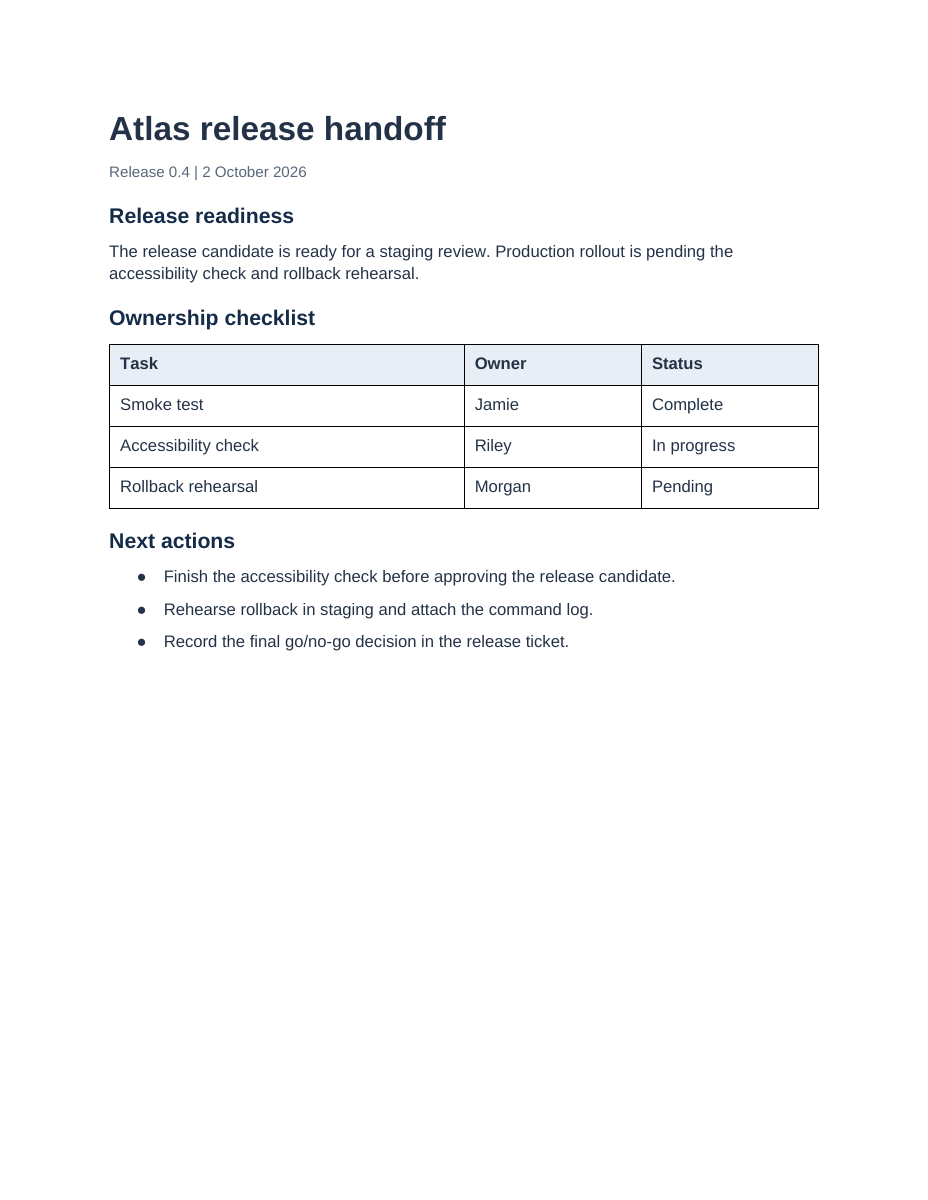
For this worked example we built an original one-page Atlas release handoff from a small JSON fixture. It contains a title, summary, three real heading-style paragraphs, a three-column ownership table and a three-item action list. Atlas, its tasks and its people are demonstration data. This is a new-document example, not an executed tracked-changes or existing-template edit.
Verified on October 2, 2026: the generator produced a DOCX; eight focused structural checks passed; LibreOffice converted it to a one-page US Letter PDF; the complete PNG render was visually inspected for clipping, table wrapping and list layout. The page was clean. Microsoft Word and Google Docs rendering were not tested. These observations apply to the downloadable artifact, not to every output the skill might create.
1. Get the input, source and actual outputs
- Download the complete DOCX example ZIP · Input JSON, generator, pinned package manifest, checker and verified output files
- Download the generated Word document · Editable DOCX, structurally checked
- Open the rendered PDF · One US Letter page
- Read the verification record · Versions, scope, warnings and SHA-256 checksums
The ZIP extracts to docx-example/. input.json is the sole content input; create_report.cjs lays it out; verify_docx.py checks the resulting archive and expected content. Files under verified/ are the actual captured outputs. A new run writes to output/, keeping the captured evidence separate.
2. Use a concrete brief and explicit dimensions
Use the docx skill to create a one-page release handoff from input.json.
Preserve all task, owner and status strings exactly. Use US Letter pages,
1-inch margins, real Heading 1 paragraphs and an editable 3-column table.
Use 4680/2340/2340 DXA column widths and matching widths on every cell.
Generate the DOCX, check its structure, render every page and inspect it.
Return the DOCX plus a PDF preview. State any render or validation limits.
A DXA unit is one twentieth of a point. The page is 12,240 × 15,840 DXA; subtracting 1,440-DXA margins on both sides leaves a 9,360-DXA content width. The table’s 4,680/2,340/2,340 columns sum to exactly 9,360. The generator sets the table width, grid widths and each cell width explicitly, so the intended geometry can be checked rather than guessed.
page: {
  size: { width: 12240, height: 15840 },
  margin: { top: 1440, right: 1440, bottom: 1440, left: 1440 }
}
// Table configuration:
width: { size: 9360, type: WidthType.DXA },
columnWidths: [4680, 2340, 2340],
layout: TableLayoutType.FIXED
// Each cell also receives the width for its column.
3. Install the pinned library and generate the document
unzip docx-example.zip
cd docx-example
npm install --ignore-scripts
node create_report.cjs
python3 verify_docx.py output/atlas-release-handoff.docx
Recorded environment: Node.js 24.19.0, npm 11.9.0, docx 9.6.1, Python 3.12.14, Debian GNU/Linux 13 and Liberation Sans. The package manifest pins the direct docx dependency to 9.6.1. Python validation uses only the standard library. The actual run used the environment’s preinstalled docx package; a fresh npm install was not part of that run. Package installation and a different operating system can introduce differences, so check your output rather than expecting a byte-identical file.
The generator deliberately uses a .cjs extension for CommonJS. That makes require("docx") work even when you copy it into a repository whose root package is configured as an ES module. Do not install the sample’s dependencies into your application package just to run the guide; keep this extracted example separate.
4. Validate structure, then render and inspect
The supplied checker opens the DOCX as a ZIP, checks ZIP integrity, parses all XML and relationship files, compares the JSON text and table cells, counts the heading styles, and asserts the page size, margins, table width and cell widths. It is a focused regression check for this example, not a complete OOXML schema validator. The upstream skill also documents its own office validation scripts for broader document work.
{
  "status": "passed",
  "table_rows_including_header": 4,
  "table_columns": 3,
  "headings": 3,
  "rendering_checked": false
}
rendering_checked: false is intentional: a structural checker cannot certify a page layout. The separate conversion and visual review below supply that evidence.
mkdir -p output/render
soffice --headless --convert-to pdf --outdir output/render \
  output/atlas-release-handoff.docx
pdfinfo output/render/atlas-release-handoff.pdf
pdftoppm -png -r 120 output/render/atlas-release-handoff.pdf \
  output/render/page
Our renderer was LibreOfficeDev 26.8.0.0.alpha0, build 2c87e51eeaa2b413ff4ae097b2705eea1995d8e5; Poppler was 26.05.0. This is the environment actually used, not a recommendation to install a development build. A supported stable LibreOffice release is a reasonable reproduction environment, but repeat the page inspection. The run emitted font-cache warnings and still produced a readable PDF and PNG. pdfinfo reported one page, 612 × 792 points. The preview below comes from that PDF.
5. Make a revision without overstating what was tested
For this generated report, change a status or an owner in input.json, rerun the generator, rerun the checker and render again. The checker reads the same input file, so it will catch missing or misplaced source text. It will not decide whether the new status is factually correct. That responsibility belongs to the source data and its reviewer.
For an existing customer template, use the separate existing-file workflow described in the pinned skill. Preserve the original as a baseline; inspect styles, sections and relationships before changing XML; then validate, repack and compare the final render with the baseline. A fresh generated report does not demonstrate that arbitrary existing formatting or tracked changes will survive an edit. This guide has not executed that separate workflow.
Troubleshooting
- “Cannot find module docx”: run
npm install --ignore-scriptsin the extracteddocx-example/directory, then run the.cjsgenerator from there. The website’s own dependency install does not install this separate example. - A table spills past the right margin: compare page content width, the table width, every grid column and every cell width. Cell padding reduces the usable text area even when the widths add up.
- The same text wraps differently on another machine: check that Liberation Sans is installed, then compare the renderer version. Font substitution and Word/LibreOffice differences can change pagination.
- A conversion produces no PDF: check the command exit status and output directory. In parallel jobs use a separate LibreOffice user profile for each process; do not accept a stale PDF from an earlier run as evidence.
- Validation passes but the output looks wrong: inspect every rendered page for clipped headings, stranded table rows, awkward line breaks and missing glyphs. Structural checks do not test layout.
- A modified report grows to two pages: that can be valid for longer input. Review the new page break and update the acceptance criterion instead of shrinking text until it is unreadable.
The Anthropic skill is source-available under its proprietary license. This download contains original TechReadly example code and demonstration data; it does not bundle the skill or change its licensing. The JavaScript docx package is a separate dependency with its own license.