
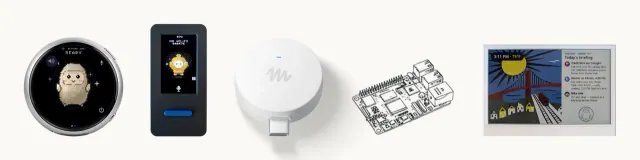
Meta Platforms released open-source SDKs and firmware on October 2 enabling developers to connect custom hardware, including ESP32 boards and Raspberry Pi computers, to its Muse assistant. The repository in Meta’s facebookincubator GitHub organization provides tools to connect displays, sensors, buttons and actuators to Muse. The SDK code uses Apache 2.0, with separate terms for listed third-party components and an exclusion for the Jollybot avatar.
The open-source release covers device software, not Muse’s model weights. Connecting to Muse requires an SDK token governed by separate service terms. These permit personal, noncommercial use and limit each token to 50 devices; the code license itself does not impose those service restrictions.
Noncommercial Service Boundaries and Setup Requirements
Every gadget needs an SDK token to pair. The device must be paired using the official Muse iOS or Android application by navigating to Settings, selecting Devices, and enabling Developer mode.
According to Meta's service terms for the gadget SDK, the SDK and tokens are provided as is and are not a supported product or developer platform. Meta reserves the right to alter or withdraw service tokens at any time. Builders cannot embed tokens into devices intended for sale, public listing, advertising, or promotional campaigns without explicit prior written authorization. While the Apache 2.0 license permits source-code modification and reuse, service access remains bounded by Meta's backend usage terms.
Linux Host Risks and Permissions
The Linux SDK supports Raspberry Pi 3B+, 4, 5 and Zero 2 W, as well as other Linux computers with Bluetooth Low Energy. It requires Raspberry Pi OS Bullseye, Debian 11, Ubuntu 22.04 or later; both 32-bit and 64-bit systems work.
Installation requires an active internet connection and an administrative account with sudo privileges. Once operational, Muse can execute shell commands, read and write local files, and report device system health. Commands dispatched by Muse execute with the same privileges as the installed local account. If the SDK is installed under an account that can use sudo, Muse can use it too.
Meta’s installer asks before granting Muse access and offers --run-as to select a different account, such as one without sudo. Device pairing remains open for a 10-minute window and establishes a fresh encrypted session. Meta warns that community-device pairing lacks manufacturer verification and cannot prevent an active man-in-the-middle attack, so it recommends pairing on a trusted network.
ESP32 Microcontroller Integration
For ESP32 hardware, the quickest starting point is the ESP32-C5 DevKitC-1 development board. Compiling and flashing the firmware requires a macOS or Linux host system running the Espressif IoT Development Framework (ESP-IDF) version 6.0.1 and a direct USB data connection.
On boards with home-network tunnel support, Muse can reach existing devices and custom projects that expose a local HTTP API. Meta warns that flashing custom firmware can brick boards or void warranties. The toolkit is aimed at people prepared to build and maintain their own devices, with service access that Meta can change or withdraw.