
For personal local AI, the best computer is usually the least expensive one that runs your chosen models well and remains useful for everything else. That makes the new RTX Spark laptops worth comparing with MacBooks, rather than simply with cloud subscriptions. Both platforms offer unified memory. Both can run local models. Neither wins a purchase decision just by advertising a large memory pool.
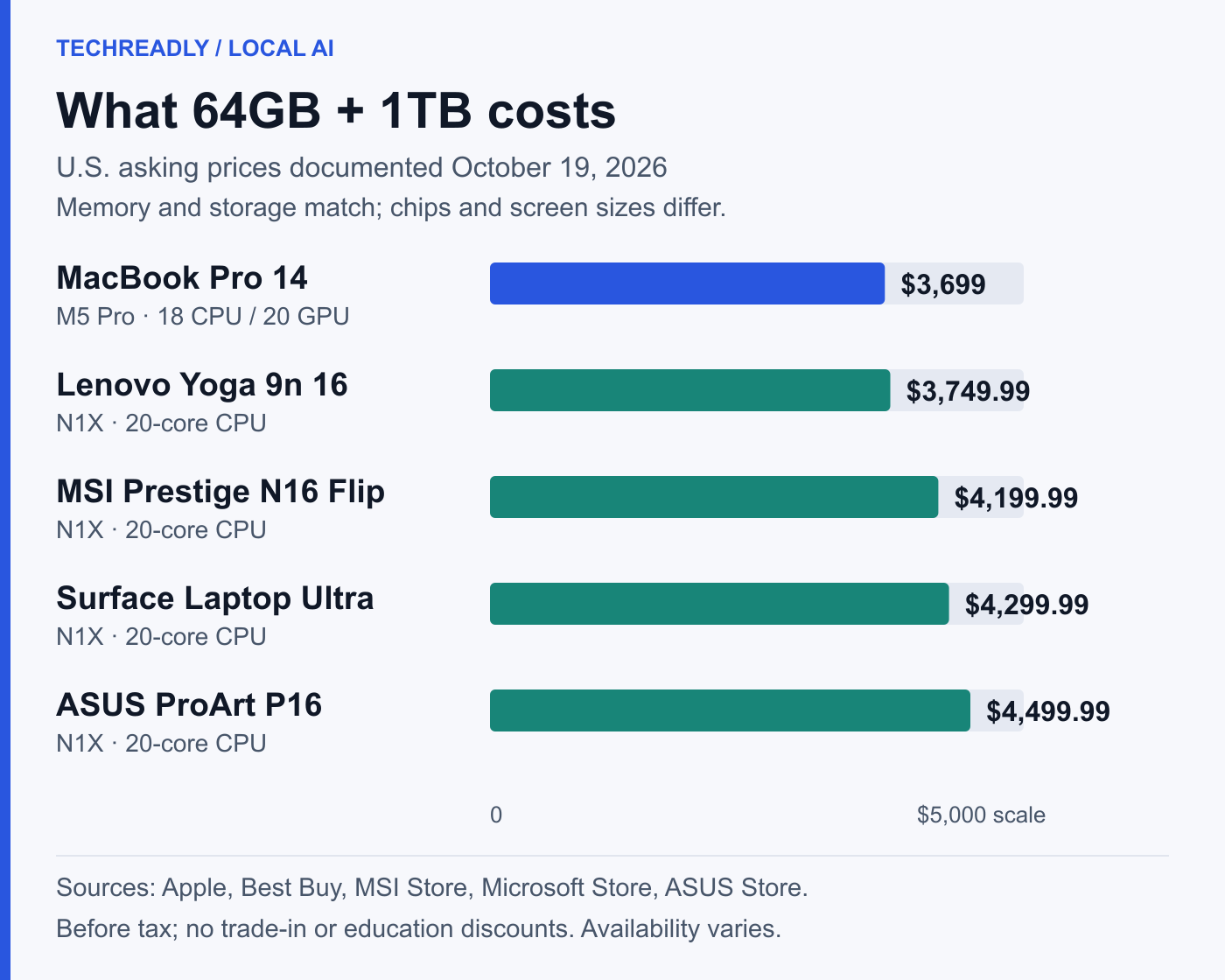
My starting recommendation is to compare a 64GB M5 Pro MacBook with the cheaper 64GB RTX Spark configurations before spending more. Apple’s current 14-inch M5 Pro configuration costs $3,699 with 64GB and a 1TB SSD. That is below several Windows alternatives, although Lenovo’s 64GB Yoga is close. The case changes at 128GB: some RTX Spark laptops cost less than Apple’s current M5 Max configuration, and the first directly comparable AI tests favor NVIDIA.
The distinction is important. A cheaper M5 Pro and a faster M5 Max are different products. Using the Pro’s price and the Max’s benchmark results would manufacture a MacBook value advantage that no buyer can actually purchase.
What the RTX Spark configurations cost
These are U.S. dollar prices checked for this October 19 comparison, before sales tax. They exclude education discounts, trade-ins and expired coupon offers. The table separates entry configurations from higher-memory models; an advertised starting price does not buy the maximum RAM. Listed prices also do not guarantee immediate delivery.
N1X comes in two relevant versions: an 18-core CPU with 5,120 GPU cores, and a 20-core CPU with 6,144 GPU cores. The table abbreviates them as 18-core and 20-core. Memory and SSD capacities belong to the listed configuration, not to an entire product family.
| Brand and model | N1X version | Unified memory / SSD | U.S. price and basis |
|---|---|---|---|
| Microsoft Surface Laptop Ultra | 18-core | 24GB / 512GB | $2,599.99, Microsoft Store entry configuration |
| Microsoft Surface Laptop Ultra | 20-core | 64GB / 1TB; 64GB / 2TB | $4,299.99; $4,699.99, Microsoft Store |
| Microsoft Surface Laptop Ultra | 20-core | 128GB / 1TB | $5,899.99, Microsoft Store |
| ASUS ProArt P14 | 18-core; 20-core | 24GB / 512GB; 128GB / 1TB | $2,599.99 entry MSRP; $6,499.99 ASUS Store listing for the 128GB model |
| ASUS ProArt P16 | 18-core | 24GB / 512GB | $2,799.99, Best Buy listing |
| ASUS ProArt P16 | 20-core | 64GB / 1TB; 128GB / 2TB | $4,499.99; $6,999.99, ASUS Store listings |
| Dell XPS 16 Creator Edition | 18-core | 32GB / 512GB | $3,799.99, Best Buy; marked Coming Soon when checked |
| HP OmniBook Ultra 16 | 20-core | 32GB / 1TB; 64GB / 2TB; 128GB / 2TB | $3,199.99; $4,999.99; $6,229.99, configurations and prices documented by StorageReview; 128GB price observed October 14 |
| Lenovo Pro 9n 15 | 18-core | 32GB / 512GB | $2,999.99, Lenovo starting configuration documented in its original review |
| Lenovo Yoga 9n 2-in-1 16 | 20-core | 64GB / 1TB | $3,749.99, Best Buy listing |
| MSI Prestige N16 Flip AI+ | 20-core | 32GB / 1TB; 64GB / 1TB | $3,299.99; $4,199.99, MSI Store listings |
The spread within Windows matters almost as much as the Mac comparison. At 64GB and 1TB, the Yoga costs $550 less than the Surface and $750 less than the ProArt P16. Displays, construction and convertible designs differ, but a personal AI buyer should have a reason to pay those premiums. More expensive branding does not establish faster inference.
The HP figures are a dated review price snapshot, rather than a promise of today’s checkout price. ASUS’s high-memory store listings showed preorder status in their product data, while availability varied elsewhere. This is a comparison of documented configurations and asking prices, not a claim that every SKU is sitting on a shelf.
Compare the MacBook you can actually configure
Apple’s live U.S. configurator gives the following 14-inch, standard-display prices. These are current configuration totals, not the March launch prices or education prices. All retain the standard keyboard and exclude optional coverage.
| MacBook Pro configuration | Unified memory / SSD | U.S. Apple price |
|---|---|---|
| M5 Pro, 15-core CPU / 16-core GPU | 24GB / 1TB | $2,499 |
| M5 Pro, 18-core CPU / 20-core GPU | 64GB / 1TB | $3,699 |
| M5 Max, 18-core CPU / 40-core GPU | 64GB / 2TB | $5,099 |
| M5 Max, 18-core CPU / 40-core GPU | 128GB / 2TB | $6,699 |
At 64GB/1TB, the M5 Pro is $50.99 below the Yoga, $500.99 below MSI and $600.99 below Surface. That supports considering the Mac first for personal use, but the Yoga gap is small enough that operating-system preference and the actual workload can readily outweigh it. The Mac is also a 14-inch machine, whereas these Windows alternatives have larger screens; equal memory and storage do not make the whole computers identical.
Moving to M5 Max reverses some comparisons. At 64GB/2TB, Apple costs $399.01 more than Surface and $99.01 more than the HP review configuration. At 128GB/2TB, Apple is $469.01 above the documented HP price, but $300.99 below ASUS. Surface’s 128GB model is $799.01 cheaper than the Mac, with only half its SSD capacity. That last comparison matches RAM, not storage.
There is no single “Windows premium” or “Apple bargain.” There are particular configurations, and the chip needed to reach a given memory tier affects the total price.
Installed RAM also differs from usable model capacity. StorageReview’s 32GB Pro 9n test allocated 12GB to the GPU and 20GB to Windows. That is a tested setting, not a universal limit. On either platform, the model, its growing context and the rest of your software need room to work.
The AI tests do not show a MacBook speed victory
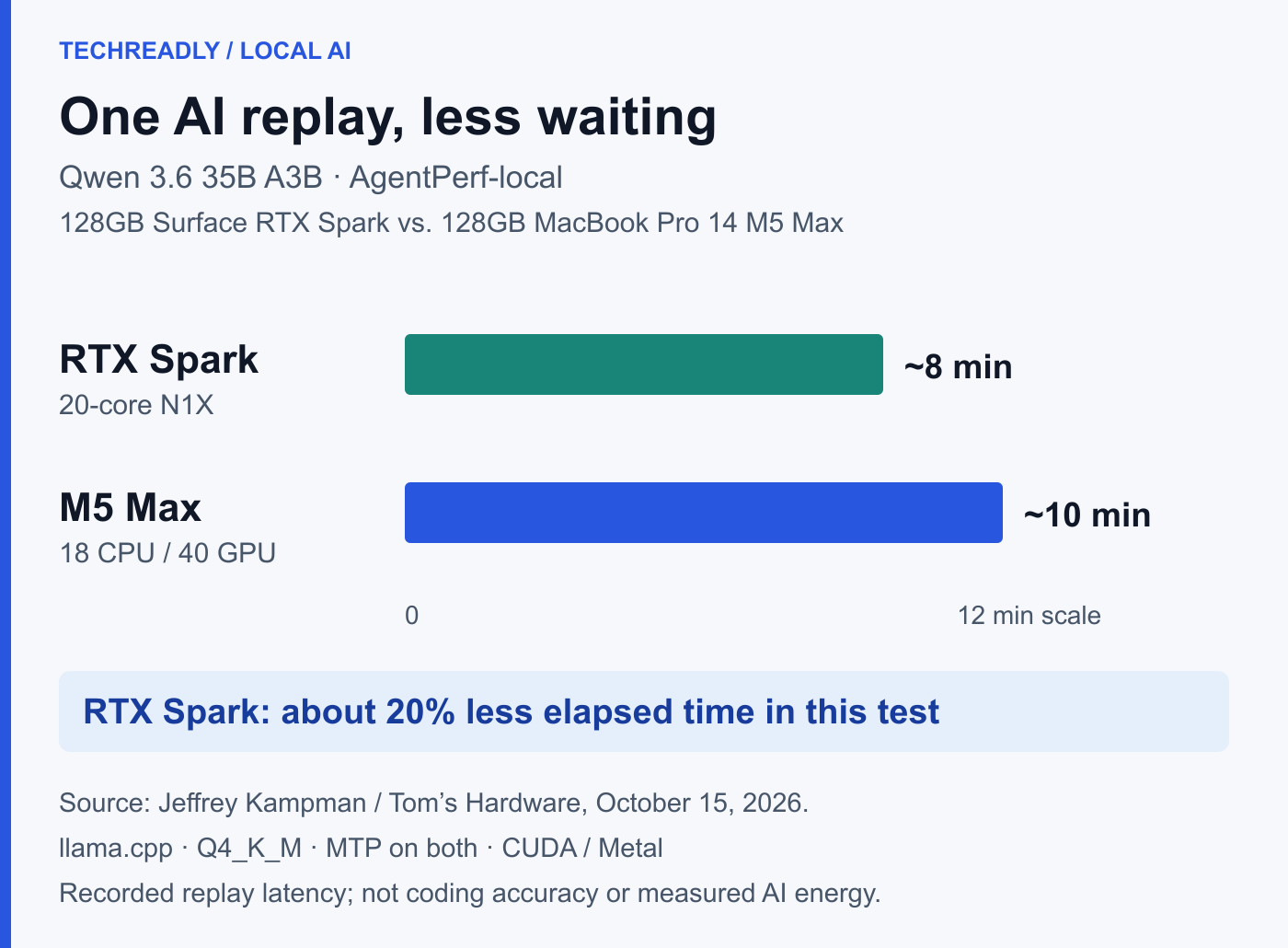
Jeffrey Kampman’s Tom’s Hardware test compared a 128GB, 20-core Surface with a 128GB, 40-GPU-core M5 Max MacBook Pro 14. Both used source-built llama.cpp, Q4_K_M weights and CUDA or Metal acceleration. Both used DFlash2 for the dense model and MTP for the mixture-of-experts model.
| Recorded agent workload | RTX Spark Surface | M5 Max MacBook Pro 14 | What the result supports |
|---|---|---|---|
| Qwen 3.8 27B, AgentPerf-local | 100, normalized time | About 125, normalized time | Mac took about 25% longer; calculated indices, not raw timings |
| Qwen 3.6 35B A3B, AgentPerf-local | About 8 minutes | About 10 minutes | 20% less elapsed time; roughly 25% higher reciprocal rate |
These results favor RTX Spark in the tested stack. They do not rank every model, test MLX against CUDA, measure an M5 Pro, or establish performance per watt. The 15-inch Surface and 14-inch Mac also have different thermal designs. Charger ratings are not measured power consumption.
AgentPerf-local replays recorded agent trajectories to measure serving latency across successive model turns. That is more informative for an agent workload than one isolated tokens-per-second number, but it is not a fresh assessment of coding accuracy. Its default replay also excludes tool time. Finishing the replay sooner does not prove that an application will produce more correct changes per hour.
The common llama.cpp backend is valuable for comparison. It still leaves a practical question open for Mac buyers: how their chosen model performs in an Apple-focused runtime. MLX is Apple’s machine-learning array framework, and MLX-LM provides local language-model generation and fine-tuning. The existence of those tools is not evidence that they overturn this particular result; it is a reason to avoid treating one backend as the permanent limit of either platform.
For the same reason, the 128GB M5 Max result cannot be pasted onto the $3,699 M5 Pro. The lower purchase price is established. Its speed in these exact workloads is not.
Everyday efficiency is a different comparison
Personal buyers also need a laptop when no model is running. Jason England’s Tom’s Guide Surface review measured 10 hours 15 minutes of web browsing on Surface, versus 21 hours 25 minutes on its 16-inch M5 Pro MacBook comparison. The Mac also led its CPU and Adobe tests. Those are concrete advantages for a mixed-use laptop, though they involve a different Mac from the 14-inch M5 Max AI test.
They are not an AI energy benchmark. Browsing endurance cannot tell us which laptop consumes fewer joules for a fixed prompt or image. A controlled inference-energy comparison would need the same model, precision, context, output and useful result, with power measured over the run. The cited reviews do not provide that matched measurement.
The practical recommendation can still be clear: if local AI is an occasional part of a day dominated by ordinary work away from an outlet, the Mac’s demonstrated general-use endurance deserves substantial weight. If repeated plugged-in inference is the main job, the direct AI test and CUDA requirements deserve more weight. Neither buyer needs to pretend that the other workload is irrelevant.
Windows on Arm can improve; buy for today’s usable software
NVIDIA’s development guide documents real progress: native tools and CUDA-enabled Windows Arm64 PyTorch builds are available. It also lists dependency gaps requiring source builds, and warns that Linux Arm64 packages cannot be installed as native Windows Python packages. Native Arm64 applications cannot directly load x64 extensions simply because Windows can emulate an x64 application.
This is an ecosystem with investment behind it, not a permanent architectural dead end. More native packages and better integration can reduce the work needed to get started. The timing and coverage of those improvements remain uncertain, however. A personal buyer should price the machine against the software that runs the desired job now.
Mac also needs the right backend and a supported model; unified memory does not make it a drop-in CUDA workstation. If a specific tool requires NVIDIA software, that can settle the decision in favor of RTX Spark. If a supported MLX or Metal workflow already does the job, Windows’ potential future improvements are a weak reason to replace a useful Mac today.
For a new personal purchase, the 64GB M5 Pro is a sensible starting shortlist alongside the competitively priced Yoga. At 128GB, compare the actual HP, Surface, ASUS and M5 Max totals: Apple is no longer automatically cheaper, and early matched inference results give NVIDIA a real argument. Buy enough memory for the model and its working context, rather than the largest capacity your budget can stretch to. For someone who already owns a capable MacBook, making that machine useful is often the most practical first experiment.